Paper character sheets are great. A paper sheet puts everything I need to know right in front of me; I don’t have to mouse, click, tap, or fiddle with a device. And I can scribble on it! When my character levels up, however, or even just prepares new spells, a paper sheet is a pain to update. But if the paper sheet is created by the right kind of software, the pain goes away.
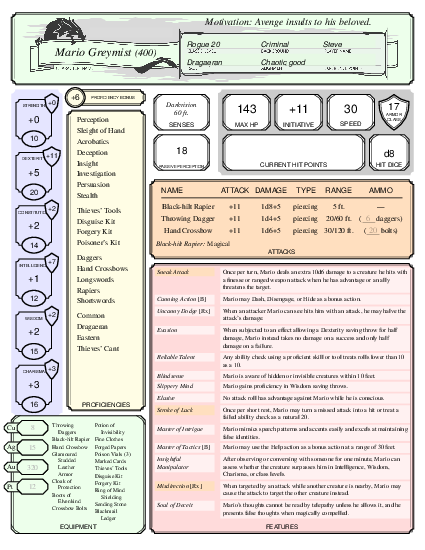
To relieve all of our pain, I have created a digital character-sheet format that is easy to read and update, plus software that produces well-designed paper sheets. As an example, here’s a fictitious character sheet in a format that I admire (click to embiggen):
This character sheet, designed by Alyssa, is readable and yet dense
with information. Use my software, and you can create character sheets
just like it. You don’t need any kind of subscription; just go to https://dnd-character-sheets.github.io
and start exploring.
A web service is great, but a web form disappears when the browser closes, and your character needs to last as long as your campaign. My web service can save your character in archival form; it uses a plain-text format called YAML. YAML is a common format that is reasonably user-friendly (beginner tutorial). Your YAML character sheets can be created and edited entirely on the web.
A YAML character sheet might start something like this:
CHARACTER NAME: Mario Greymist
CLASS: Rogue
LEVEL: 20
PLAYER NAME: Steve
RACE: Dragaeran
ALIGNMENT: Chaotic good

STR: 10
DEX: 20
CON: 14
INT: 12
WIS: 15
CHA: 16

PROFICIENCIES:
  - Perception
  - Sleight of Hand
  -
  - Daggers
# ... and so on
You can download Mario’s complete character sheet from the web site.
The web service has two parts: a site with a form that you can use to describe your character, and a back end that renders your sheet as PDF. Once you have a character in the form, you can download it as a YAML file, which you can keep as long as you want. When you want to change your character sheet, or just generate new PDF, go back to the site and upload your YAML. You will find all the important buttons (“upload”, “download”, and “generate PDF”) at the beginning of the web form.
To help you get started, I have provided some pregenerated characters to play with.
Go to https://dnd-character-sheets.github.io.
From the first dropdown (“best at 2 columns”), choose a pregenerated
character, perhaps Mario. Then click “Load this character” on the
right.
Click the “Generate PDF” button. After a few seconds, your browser should show the PDF in a new tab.
Go back to the web form and look for a “Download
mario-greymist.yaml” button. Click to save Mario’s sheet on
your machine. (By default, a YAML file that you download is named for
the character, or if there is no character name, for the character’s
class.)
This is a hobby project, and the web hosting has been graciously provided by friends at Tufts. Don’t expect it always to be up or to last forever, and please don’t abuse my friends’ generosity.
The web form works just fine, but if you are an experienced computer user, you may prefer to edit your YAML character sheet on your own machine. In this case you will use a text editor like Emacs, vim, or Notepad, and you will continue to use the web service to generate PDF:
Go to the web site and use the “Upload YAML file” button to load your character sheet into the web form.
Click “Generate PDF.”
If you have Linux and are comfortable with software, you can try
dispensing with the web service and generating PDF on your own machine.
The software you’ll need is sketched in INSTALL.html, and my code is in a Github
repository. If you want help, ask.
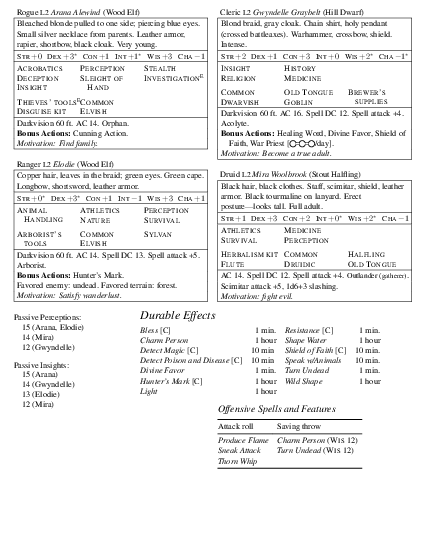
If you do install the software locally, you get a couple of other goodies. In particular, you can create a one-page summary of characters’ important abilities and stats, for a GM to use at the table:
To get started with YAML, you can work through my Quick-Start Guide, or you can download one of
the pregenerated characters from https://dnd-character-sheets.github.io.
Every YAML character sheet contains key-value pairs in the form
KEY: valueCharacter-sheet keys are uppercase by convention, and a value is
usually a string, a number, or a list. Lists look like Markdown lists,
in which each item is a string marked with a leading dash. Most items
are strings, but an item that describes an attack, a feature, or a magic
spell is itself a list of named properties. For example, a feature has a
name and a description. An attack has
DAMAGE, a TYPE, possibly a RANGE,
and other properties.
You can edit a character sheet both on your machine and on the
web form. If you upload your YAML to the web form, edit on the form, and
download the result, the software should preserve all your YAML
data—even fields that don’t appear on the form. But the software may add
a few fields, and it may change empty values to null.
Finally, the software removes blank lines, because they are not visible
to a YAML parser.
YAML is just a format; to write anything meaningful, you must know
what keys to use. My software recognizes over 60 keys, from
ARMOR CLASS to WIS. Each key is described in a
project-specific YAML reference, but you are
probably better off using the Quick-Start
Guide.
There are eight million stories digital character sheets
in the naked city various corners of the Web. If you are
willing to use a large language model, the popular chatbots can extract
pretty good YAML from a web page or PDF. Show the bot an example YAML
sheet or the user documentation, then ask it to
convert whatever format you have to the YAML format.
To see more examples of YAML, including fragments that you might want
to incorporate into your own character sheets, check out the yaml directory. For example, if you want to
roll up a ranger, you can include yaml/ranger-class.yaml.
Or if your druid is about to specialize, try yaml/circle-of-the-land-forest.yaml.
The snippets in the yaml directory
aren’t comprehensive; they are just fragments I put together for my own
game. If you find them useful, we’re both surprised and pleased.
My YAML doesn’t support all of D&D 5e.
The character sheets are meant to be used at the table, and I want everything I need on one sheet of paper. So my format doesn’t support such properties as traits, bonds, ideals—they’re not immediately useful during play, and I could not find room for them. If these are things that you want, sketch the layout you are looking for and open a Github issue.
Electrum pieces clutter the character sheet, and they tend to confuse players: unlike the other coins, they are not ten times as valuable as the next most valuable coin. Electrum pieces do have a dedicated YAML key, but they do not display on any of the existing layouts.
Although I have some training in information design, I am not a graphic designer. If you want another layout, please open a Github issue.
Your YAML is sent to my server, but it stays there only long enough to render your PDF—I don’t keep it archivally. I do keep a copy of the most recently submitted sheet, to help with debugging.
This project started out with a simple design philosophy: “Don’t
calculate anything; just render what’s in the YAML.”
But as I used the software for my own game, I gradually let some
calculation slip in.
In similar fashion, the YAML entries, especially for magic and class features, have gradually accrued more and more optional fields, including descriptions at three lengths. (But nothing like the full complexity of the 5etools database, which has to be seen to be believed.)
The result of all this feature creep is that the design, although useful, is no longer intellectually coherent.
I used AI for help with code. I do not love theft of intellectual property or the likelihood of AI putting creative artists out of work. But the popular models are trained on my work—I have been putting code on the public internet for over 35 years—and given my contributions, I wish to reap some of the benefits.
I have not used AI blindly; except for parts of the JavaScript, I have reviewed every line of AI-generated code, and I have rewritten most of it.
And AI doesn’t write for me; this README is all mine.
The pregenerated characters and the bones of the three-column template were supplied by NoxAeternus.
The two-column template is taken from the module The Fall of Silverpine Watch by The Angry GM. (The Angry GM uses Linux now, you know.) The template was originally designed by Alyssa.
The tropical template was designed by French Rice Meɹman.